
The process sets the paths
The agent can only trigger one of the fixed exits. It cannot choose a path that nobody has modelled.
Put AI agents straight into your workflows: an agent checks applications including their attachments, looks things up in your data and knowledge sources, asks questions and delivers a validated result. Where the case goes next is set by your process model – not by the AI.
Many AI features end with a single call: text in, text out. An agent can do more. It works through a task in several steps, uses approved tools to do so and decides for itself when it is finished or needs a person.
In the workflow, the agent is a node of its own. You describe the task in plain language, choose the fields and attachments it may see, and define which tools it may use. Its result lands in fields of your workflow form and is validated like a submitted form.
From there, the process continues through fixed exits: result, question, handover to a person, limit reached or error. Each exit is a visible path in the process model. That keeps what the AI did traceable – and what happens next under control.
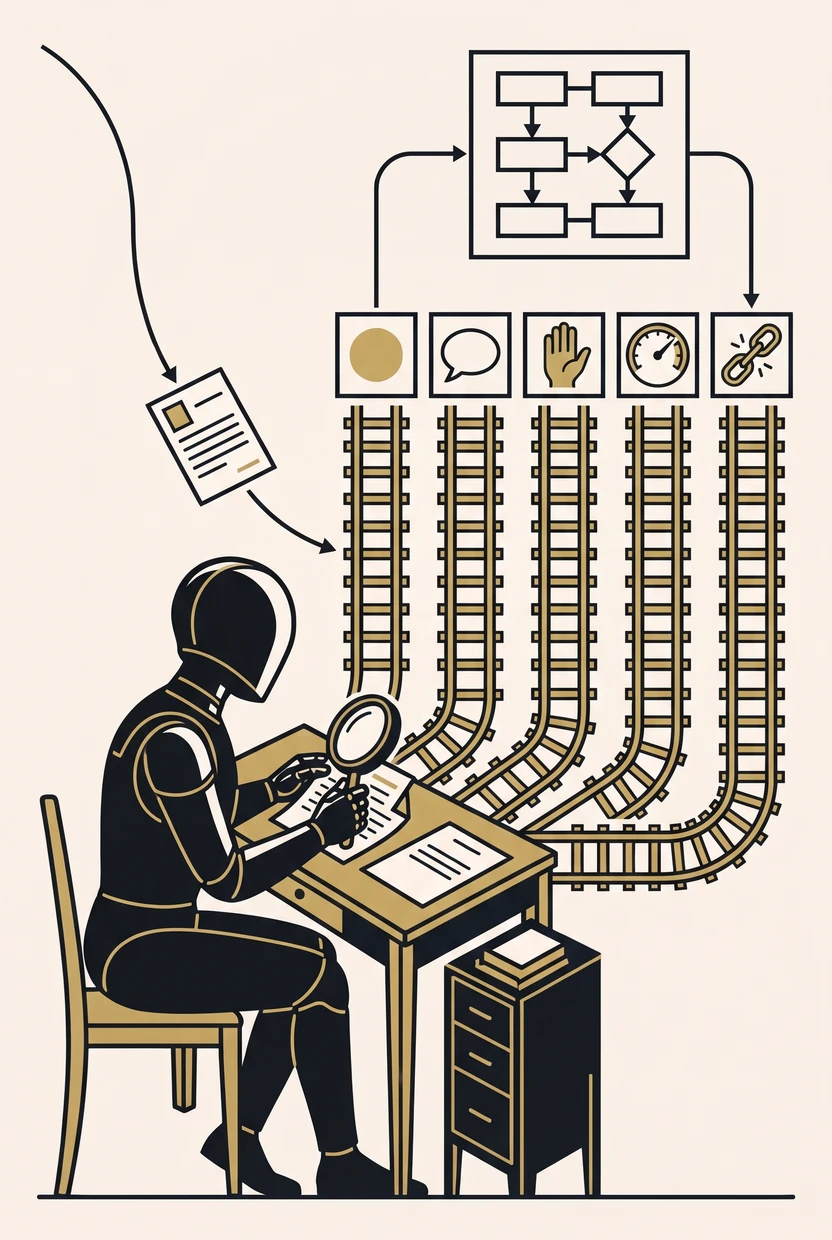
agent_done agent_question agent_handover agent_limit agent_error The agent can only trigger one of the fixed exits. It cannot choose a path that nobody has modelled.
Required fields, allowed values and rules come from the workflow form. If the result fails twice, a person takes over and sees the draft.
Model calls, tool calls, run time and cost are capped per run. The installation sets upper limits that no workflow can exceed. Once a limit is reached, the case continues through an exit of its own.
Record runs and replay them at no cost. Fixed test responses check paths such as question or limit without calling a model.
Every step in the log, with tokens and cost, without keys or secrets. In the history, every AI output is marked as such.
Any model with an OpenAI-compatible interface: Azure OpenAI, an in-house model farm, locally operated models. No automatic fallback to a public provider.
Form texts, attachments and search results reach the model as data with their origin, not as instructions. Whoever writes an application cannot give the agent orders.
Questions and handovers are modelled tasks with fixed assignees. Below an adjustable confidence threshold, the agent hands over instead of guessing.
Without approval, the agent reads only what the node gives it. Tables are approved one by one, down to field level if required.
Read-only tools from external MCP servers (e.g. documentation, DMS, search). A person approves each tool individually. If the provider changes a tool’s description, it has to be approved again.
Intermediate results appear in the case history. On long runs, older search results are shortened once the model has been able to note what it still needs.
Task, inputs with their origin, result section, model, tools and limits in the workflow editor. An AI assistant can create agent workflows too; validation then reports missing exits and approvals.
A single AI model always sounds convinced, even when it is wrong. That is why, at important steps, the workflow application lets several agents work independently of one another, if you wish with models from different providers or with your own model environment. The process then evaluates the results by a fixed rule, such as unanimity or majority.
If the agents agree, the case continues automatically. If they do not, it goes to a person. A further agent then prepares the decision: it shows where the assessments differ and proposes a way forward. If an agent does not respond in time, the process evaluates what is available once a deadline has passed.
Every step stays traceable: which model decided what, and why, is recorded in the case history. You can use the same building blocks without AI, for instance when several departments are to comment in parallel.
An agent can do more than read and summarise: it creates customers, drafts quotes and triggers approvals. To do so, you hand it process steps such as "Create customer" or "Send quote". You model each step in the workflow as usual: whether data is saved, who has to agree beforehand and who gets notified.
The agent chooses for itself which step it needs and when, and fills in the required details. Then the process takes over, and the agent learns the result. If sales management rejects a quote, it revises the quote and resubmits it.
The AI decides what needs doing. Your process carries it out.
Three examples: master data, a quote with approval, two quotes at onceFrom the assistant in a business application to the AI that builds the process: who triggers it, what the agent may do, who has the last word.
Why one model alone is not enough, and how a person decides when the agents disagree.
How an agent creates customers and drafts quotes without working around your data. With three examples.
Send us a complex process. It does not have to be your internal one – an invented one, a publicly documented one, one from an old manual. Anything with roles, deadlines and approvals. The trickier, the better.
You get it back: built, played through by every role, with the test report and with test accounts. That includes a process with an agent step: the AI builds it and plays it through as every role. Paths such as question or limit are checked with fixed test responses, without calling a model.
What you get and what you do not: Frequently asked questions